tsumiba
Notes and files, one gesture away.
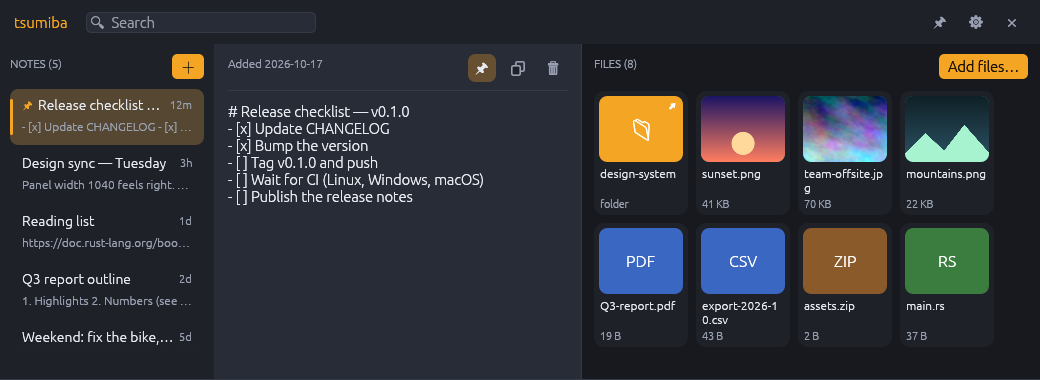
tsumiba (積み場, “a place to pile things”) is a memo and file shelf that slides in from the top edge of your screen. Rest the pointer on the edge, or press a shortcut, and it drops down: jot a note, drop a file on it, and get back to what you were doing. It hides itself when you do, and it costs nothing while it is hidden.
It runs on Windows, macOS and Linux, is written in Rust, and is MIT licensed.
What it is, and what it is not
tsumiba is the part of Unclutter that people reach for most, rebuilt for every desktop. Unclutter, which is macOS-only, has three panels: a clipboard history, a file drop zone and notes. tsumiba keeps two of them, on purpose: notes and files. There is no clipboard manager.
On top of that it adds a browser extension that sends the page, selection, link or image you are looking at to the shelf, and a command line for scripts.
| Notes | Plain Markdown files, saved as you type, searchable, pinnable. Opening the shelf puts you in an empty note, ready to type. |
| Files | Drop anything on it. Keep a private copy, or just remember where the original is. Thumbnails for images. Deleted items stay in a trash for 30 days. |
| Browser extension | Chrome, Edge, Brave and Firefox. Right-click → Send to tsumiba, or use the popup for a quick note. |
| Command line | tsumiba note "buy milk", tsumiba add report.pdf, tsumiba list --json. Works with or without the app running. |
| Local and private | No account, no cloud, no telemetry. The only thing it listens on is 127.0.0.1, behind a token. |
| English and Japanese | The interface follows your system language; light and dark themes follow your system too. |
Where to start
- New here? Install it, then read Summoning the shelf.
- Want the browser button? Browser extension.
- Scripting? Command line and the HTTP API.
- Something not working? Troubleshooting and FAQ.
An honest status
This is version 0.1.0. What has and has not been checked is spelled out on the Platform support page; in short:
- The window, the top-edge trigger, the shortcut and drag-to-edge were exercised end to end on Linux (X11), under a virtual display.
- Windows and macOS builds are compiled, linted and tested by CI (including the storage layer, the HTTP API and the command line), but the window, tray and shortcut behaviour there has not been verified on real machines yet.
- On Wayland an application cannot watch the pointer or grab a key, so the shelf
is an ordinary window there and you bind
tsumiba toggleto a key yourself. - Dragging a file out of the shelf into another app is not supported yet. Files explains why and what to do instead.